Pause menu and settings
The menu at the top left pauses the game. Settings holds sound, hints, screen direction and achievements.
At a glance
- Pause
- menu at the top left during a game
- Pause menu
- Resume · Restart · Settings · Home
- Settings
- Sound · Music · Vibration · Hints · Screen · Achievements
- Achievements
- open after your first 10 games
- Ad-free pass
- Android app: 1 week, 3 months or 1 year, no auto-renewal
Step by step
-
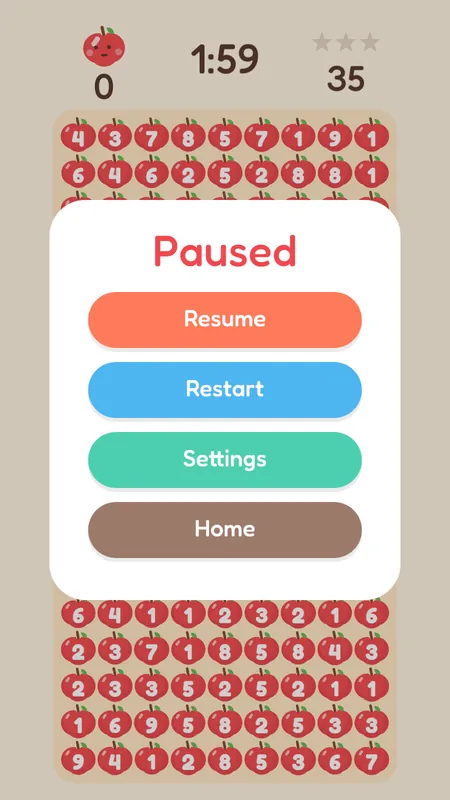
Pause
Tap the menu at the top left. The clock stops. Restart and Home ask once more so you don't lose a game by accident.
-
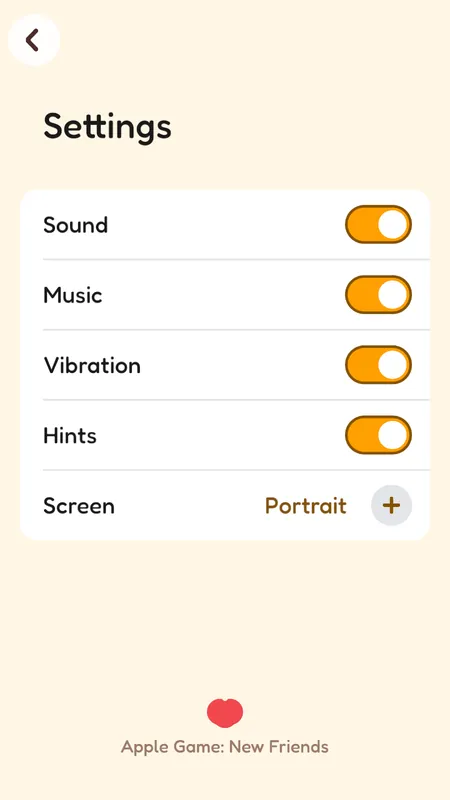
Settings
Switch sound, music, vibration and hints on or off, and choose portrait or landscape. Achievements shows your medals.
Rules
- A 1 : 1 game has no Restart — you cannot start a shared game over on your own.
- Achievements are medals for things like friends beaten and apples popped. They open after your first 10 games.
- The Android app shows a short ad between games. The ad-free pass removes them for the time you choose.
Questions
Can I play in landscape?
Yes. Choose it under Settings → Screen. In a browser the game picks the shape that fits the window.